Last Updated: September 25, 2026
Aquarium lighting schedule advice usually arrives as a single number of hours, which ignores the fact that a fish-only tank, a low-light planted tank and an injected aquascape all want different periods. The two tables below give a starting photoperiod by tank type, and then the practical factors that move that figure up or down.
As an Amazon Associate we earn from qualifying purchases.
As an Amazon Associate we earn from qualifying purchases at no extra cost to you. Prices and availability are accurate as of the date shown and are subject to change.

hygger Clip On 24/7 Lighting Aquarium LED Light,Sunrise-Daylight-Moonlight and DIY Mode, Adjustable Timer/Brightness Fish Tank Light with 7 Colors for Planted Tank (14W for 12~20in Tank)
Selected for "Aquarium Lighting Schedule: Hours by Tank Type and Goal": this listing is lighting (hygger Clip On 24/7 Lighting Aquarium LED Light,Sunrise-Daylight-Moonl), matching the equipment this article covers.
View on Amazon
NICREW Aquarium Light Timer & Dimmer, Fish Tank Light Controller
Selected for "Aquarium Lighting Schedule: Hours by Tank Type and Goal": this listing is lighting (NICREW Aquarium Light Timer & Dimmer, Fish Tank Light Controller), matching the equipment this article covers.
View on Amazon
hygger 0.5-3 Gallon Small Aquarium LED Light for Fish Tank Full Spectrum Lighting with 24/7 Day-Night Cycle & Auto On/Off Timer, Adjustable Brightness, 7 Colors Options, Extendable Bracket Plant Light
Selected for "Aquarium Lighting Schedule: Hours by Tank Type and Goal": this listing is lighting (hygger 0.5-3 Gallon Small Aquarium LED Light for Fish Tank Full Spectr), matching the equipment this article covers.
View on Amazon
NICREW SkyLED Plus Aquarium Plant Light, Freshwater Fish Tank Light with Ramp Up and Dim Down, Spectrum Adjustable and Lighting Schedule Programmable with Controller, 12-18 Inches, 11 Watts
Selected for "Aquarium Lighting Schedule: Hours by Tank Type and Goal": this listing is lighting (NICREW SkyLED Plus Aquarium Plant Light, Freshwater Fish Tank Light wi), matching the equipment this article covers.
View on AmazonBy David Nguyen
The Photoperiod Tables and How to Read Them
A useful aquarium lighting schedule needs two inputs rather than just one: what the tank contains and how much light the fixture delivers. Find your tank type in the first table for a starting period, then work through the second table for the conditions that shift it up or down.
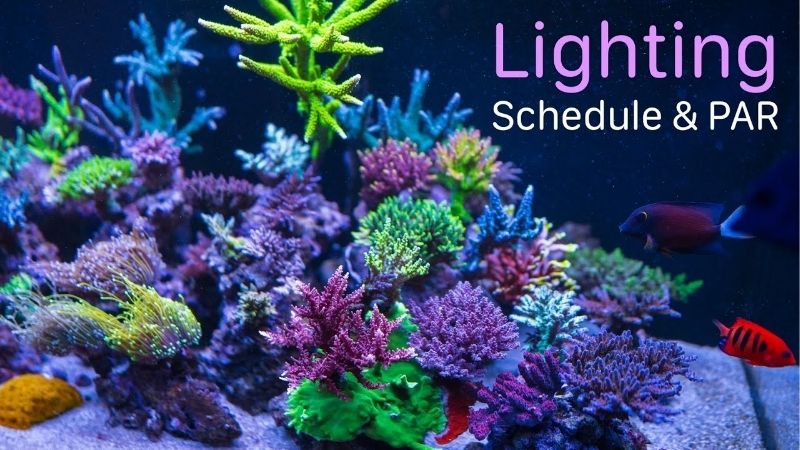
The decisive number: photoperiod by tank type
Six to eight hours covers the great majority of freshwater tanks in practice, and the safe approach in any new setup is to start at the lower end and extend only if plants respond poorly. Consistency matters more than the exact figure, which is why a timer belongs in every setup.
| Tank type | Starting photoperiod | Typical range | Notes |
|---|---|---|---|
| Fish only, artificial décor | 6 hours | 6–8 hours | Viewing hours matter more than growth |
| Low-light planted, no CO2 | 6 hours | 6–8 hours | Extend slowly if growth stalls |
| Medium-light planted | 7 hours | 6–8 hours | Watch for algae before extending |
| Injected high-tech planted | 6 hours peak | 6–9 hours total | Ramp up and down around the peak |
| New tank, first 6–8 weeks | 5–6 hours | Raise gradually | Plants and biofilter still establishing |
The siesta split and ramping, with a worked example
A siesta schedule divides the photoperiod into two separate blocks with a dark gap in the middle, commonly four hours on, three off, then three on. The intention is to let carbon dioxide levels recover during the gap, and many low-tech keepers report fewer algae problems using it.
An aquarium lighting schedule can be shaped rather than simply switched. Fixtures that ramp up and down over twenty or thirty minutes look better and settle fish more than an abrupt switch, and a short high-intensity peak inside a longer gentle period gives growth without extending the algae window.
| Condition | Effect on the schedule | What to do |
|---|---|---|
| Algae appearing on glass | Reduce by 1–2 hours | Shorten first, dim second |
| Tank near a bright window | Effective period is longer | Cut an hour, or move the tank |
| Plants leggy and pale | Light may be too weak | Raise intensity before hours |
| New tank under 8 weeks old | Start shorter | Begin at 5–6 hours, extend slowly |
| Injected CO2 running | Peak can be shorter | Ramp around a 6 hour peak |
Reading the tables, units and tolerance
Treat every figure in those tables as a starting point rather than as a prescription, because the correct period depends on intensity, which the tables cannot see. A dim fixture running eight hours and a bright one running six can deliver similar total light to the plants below them.
Fifteen or twenty minutes either way makes no practical difference at all, so there is no need to chase precision here. What matters is that the schedule repeats identically each day, since irregular lighting is the single most common cause of algae in otherwise well-maintained tanks.
Adjusting the Schedule for Real Rooms
The tables above assume a tank standing well away from windows in a normally lit room. Any aquarium lighting schedule has to account for the light the tank receives when the fixture is off, and for how the plants and algae in that particular tank respond over the following weeks.
Adjusting for ambient room light and windows
Daylight reaching the tank adds to the effective photoperiod without appearing on any timer. A tank beside a south-facing window can receive several hours of usable light beyond the scheduled period, which is why window-side tanks so often develop algae despite a sensible setting.
Seasonality matters a great deal here as well. Daylight hours stretch out considerably from late spring into midsummer, so a schedule that worked perfectly well through winter can quietly become too long by June, and a tank that stayed clean for months starts showing green film on the glass.
Adjusting for algae and plant response
Algae on the glass within days of a change means the period or the intensity is too high, and shortening the schedule by an hour is the cheaper first move. Give any change two to three weeks before judging it, since tanks respond slowly and repeated adjustments confuse the picture.
Plants that grow leggy, with long gaps between the individual leaves, are usually short of intensity rather than short of hours. Extending the photoperiod in that situation feeds the algae more than it feeds the plants, so raise intensity or lower the fixture first and leave the schedule where it is.
Tank size, placement and physical fit
The position of the tank affects the schedule just as much as the fixture itself does. A tank kept away from windows and out of direct sun holds a predictable light budget, whereas one standing on a sunny sill is effectively running a much longer photoperiod than the timer suggests it is.
Weight limits where the tank can be moved to. A full tank runs near 10 lb per gallon (about 1 kg per L), so a 55 gallon (208 L) setup passes 600 lb (272 kg) and needs a purpose-built stand. Measure the space and the stand with a tape before ordering, and plan the position before filling.
The Limits of a Fixed Schedule
Hours are only one of several variables that decide how a tank actually looks. Any aquarium lighting schedule reduces a system of intensity, spectrum, nutrients and carbon to a single number, and there are several situations where adjusting hours is simply the wrong lever to reach for.
When hours are not the problem at all
Algae driven by excess nutrients does not respond well to a shorter photoperiod alone. Check first that ammonia and nitrite read 0 ppm and that nitrate sits at 20–40 ppm, then review feeding and water change frequency, because organic waste feeds algae regardless of the timer setting.
Equally, a tank stripped of its nitrate by very heavy water changes starves the plants directly, and the resulting poor growth is very often blamed on the lighting instead. Plants need nutrients as well as light, and a schedule change cannot compensate for a nutrient level held near zero.
What the schedule cannot capture
Intensity is the most obvious omission of all. A high-output fixture running for six hours delivers far more total light than a low-output one running eight, so two tanks on identical schedules can sit at opposite ends of the algae spectrum without either owner doing anything wrong.
Spectrum and mounting height both matter here too. The same fixture raised by a few inches (several cm) delivers noticeably less light to the substrate, which changes the appropriate period, and none of that appears anywhere in a table organised purely around tank type and hours.
When to ignore the table and watch the tank
Observation beats arithmetic here in both directions. Green film returning within days of cleaning the glass means the light budget is too high whatever the timer says, and plants melting or thinning at the base usually means it is too low regardless of a schedule that looks correct.
Fish behaviour is worth watching quite closely here as well. A tank that switches on abruptly at full intensity visibly startles fish, and they settle noticeably better under a ramped start, which is a change worth making even where the total number of hours stays exactly where it was.
Verifying the Schedule and Reviewing It
A schedule is only useful if it actually runs the way it was intended, and mechanical timers drift while tanks change with the seasons. Verifying an aquarium lighting schedule takes very little effort, and reviewing it a few times a year catches the slow problems before algae appears.
How to verify what is actually happening
Check the timer against a clock every few months or so, since cheap mechanical timers lose accuracy and a power cut resets many of them entirely. A digital timer or a fixture with built-in scheduling avoids that, though both still need checking after any interruption to the supply.
Keep a short written log for the first month after making any change: hours set, algae observed and how the plants grew. That record is far more useful than memory, because tank responses take two to three weeks to appear and by then the details of what changed are easily forgotten.
How often to review the setting
Review the schedule seasonally rather than continuously fiddling with it. The obvious points are late spring, when daylight lengthens and window-side tanks start receiving more ambient light, and autumn, when the reverse happens and a slightly longer period may become appropriate again.
Review it again after any change to the tank itself: new plants, heavier stocking, a different fixture or a change of position in the room. Each of those alters the balance, and holding an old schedule through a significant change is a common route into a persistent algae problem.
Equipment that drifts away from the plan
LED output declines slowly across the years rather than failing outright, so a fixture that suited a six hour period when it was new may deliver noticeably less by its fourth or fifth year. That is a reason to review the schedule, not a reason to replace an otherwise working unit.
Mechanical timers wear and lose minutes, and their pins can easily be knocked during maintenance. Digital timers hold their settings better but lose them in a power cut unless they have a backup battery, which is worth checking after any outage rather than assuming the schedule survived.
Frequently Asked Questions
These questions tend to follow naturally from using the tables above, because any aquarium lighting schedule interacts with intensity, ambient daylight and nutrient levels, and changing the hours alone often produces far less improvement than people expect from the effort involved.
Is a longer photoperiod better for plants?
Not once the overall light level is already adequate. Beyond roughly eight hours, the extra time favours algae far more than it favours plants, because plants become limited by carbon and nutrients, while algae is far better at exploiting whatever surplus light remains available in the tank.
Does the siesta method really reduce algae?
Many low-tech keepers find that it helps, and the reasoning is that carbon dioxide levels recover during the dark gap. Evidence is largely experiential rather than formal, so treat it as a technique worth trying rather than a guaranteed fix, and give it several weeks before judging.
Should the light run when I am not home?
Set the schedule around your own viewing hours where possible, since a tank lit at times when nobody sees it provides no benefit at all while still growing algae. On a planted tank, keep the total period consistent and simply shift the whole block so that it overlaps the evening.
Do fish need a period of darkness?
Yes, they do. Most species rest during the dark hours and a continuous light period is genuinely stressful, so every tank should have a clear night period. Ambient room light is usually enough for the tank not to be pitch dark, and a dedicated night light is very rarely necessary.
See More:
Conclusion
A workable aquarium lighting schedule starts at around 6 hours for a new or low-light tank, sits at 6–8 hours for most established setups, and extends only once the plants show that they need it. Run it on a timer, keep it identical every single day, and change only one thing at a time.
Best Aquarium Heater With Digital Display: Smart Choices
Best Aquarium Timer Plug for Lights: Proven Reliable Picks