Last Updated: October 4, 2026
The best aquarium timer plug for lights keeps a repeatable light schedule with enough resolution, program count, a proper electrical rating and outage memory. This guide compares four current timers on those points, from a one-minute digital unit to a mechanical dial, so your photoperiod stays consistent day after day.
As an Amazon Associate we earn from qualifying purchases.
By David Nguyen
How to Choose a Light Timer
Choosing a light timer comes down to four checks: digital versus mechanical control, how many on-off programs you need, the electrical rating for your load, and whether Wi-Fi adds anything over a reliable standalone timer for your routine.
Digital vs mechanical
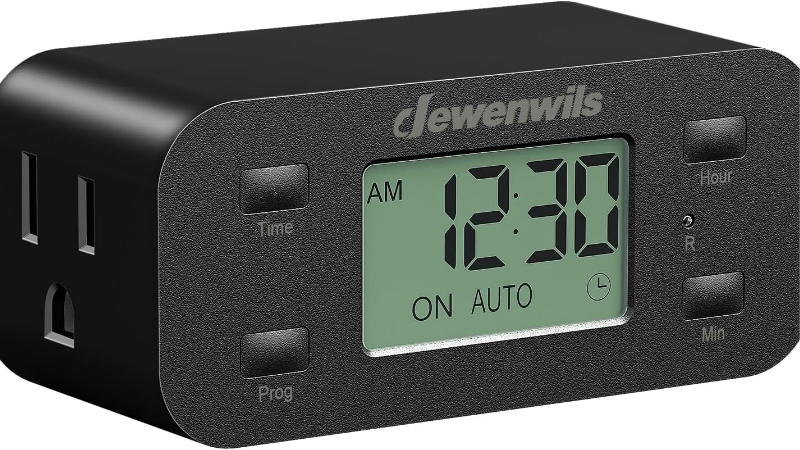
Decide between digital and mechanical control. A digital timer like the BN-LINK SU88C offers one-minute scheduling and multiple programs with a backup battery, while a mechanical dial like the CP-U4NA uses 15-minute segments, giving 96 positions a day in a simple, cheap, set-and-forget package.
One-minute resolution sounds far finer than 15-minute steps, and it is 93.3% shorter per increment, but that is scheduling granularity, not clock accuracy, so do not read it as fifteen times more accurate timekeeping. Choose digital for precise, flexible schedules and mechanical for rock-simple reliability at a lower price.
Count programs
Count the on-off programs you need, since a simple photoperiod uses one while a siesta schedule or ramping setup needs more. The SU88C and FD60-U6 each offer eight on-off programs, enough for split photoperiods, while a basic single-on, single-off routine needs far fewer than that.
More programs let you split the day, such as lights on, a midday break to curb algae, then on again. If you only ever want one daily cycle, a simpler timer suffices. Match the program count to how complex your lighting schedule actually is rather than paying for slots you will never use.
Verify electrical rating
Verify the electrical rating for your load, since 15 amps does not translate to the same wattage for every device. The CP-U4NA, for instance, is rated 1875 watts resistive but only 8 amps for a tungsten load, so the safe capacity depends on the load type, not just the amperage.
Aquarium LEDs draw little, so most timers handle them easily, but check the rating if you run several fixtures or other gear. Do not assume 15 amps means 1800-plus watts for any load. Read the load-specific rating and keep your total draw comfortably beneath it for safe, reliable switching.
Decide if Wi-Fi is needed
Decide whether Wi-Fi is worth it, since a standalone timer is often all a fixed light schedule needs. A smart plug like the Kasa EP25P4 adds app control and remote scheduling, useful if you travel or tweak times often, but it costs far more than a simple dedicated timer.
For a set-and-forget photoperiod, a reliable digital or mechanical timer does the job without an app or network dependency. Choose Wi-Fi when remote control genuinely helps your routine, not by default. Many keepers find a good standalone timer more dependable than a plug that relies on a working connection.
Top Picks
These four cover the best aquarium timer plug for lights, from a one-minute digital unit to a mechanical dial and a smart option. Compare them on resolution, program count and electrical rating, remembering that finer scheduling resolution is not the same as better clock accuracy.
| Product | Best For | Key Spec | Watch Out For |
|---|---|---|---|
| BN-LINK SU88C | Best Overall | 8 programs; 1-min interval; 125V 15A; battery backup | Digital; ~under $20 (09/2026) |
| BN-LINK FD60-U6 | Two Outlets | 8 programs; 115V 15A 1725W; 2 grounded outlets | From ~under $20 (09/2026) |
| BN-LINK CP-U4NA | Mechanical Dial | 15-min resolution; 96 positions/day | 1875W resistive/8A tungsten; ~under $20/2 (~$8 each) |
| Kasa EP25P4 | Smart Option | 15A/1800W; app schedules | Needs 2.4GHz; ~under $80/4 |
SU88C: Best Overall
The BN-LINK SU88C strikes the best balance: one-minute scheduling, eight on-off programs, a 125-volt 15-amp rating and a backup battery that preserves the schedule through an outage, at about $15. That combination of fine resolution, ample programs and outage memory covers almost any planted-tank photoperiod.
The one-minute interval lets you set exact on and off times and split the day for a siesta if you want, while the battery keeps your program after a power cut. Its rating comfortably handles LED lights. For a precise, dependable digital light timer at a low price, it leads this group clearly.
FD60-U6
The BN-LINK FD60-U6 offers eight programs across two independently controlled grounded outlets, rated 115 volts, 15 amps and 1725 watts, from about $15. The two controlled outlets are its edge, letting you run two lights or a light and another device on the same schedules from one timer.
For a tank with separate fixtures, or a light plus a secondary device, controlling two outlets from one unit is tidy and cost-effective. It shares the eight-program flexibility of the SU88C. Check your combined load against the 1725-watt rating, though LEDs leave plenty of headroom in practice for most tanks.
CP-U4NA
The BN-LINK CP-U4NA is the mechanical dial option at about $15 for a two-pack, roughly $8 per timer, with 15-minute resolution giving 96 positions a day. Its rating is load-specific: 1875 watts resistive but 8 amps for a tungsten load, so match it to what you are actually switching.
Mechanical timers are simple and reliable with no battery or network to fail, though 15-minute steps are coarser than digital and the dial can be knocked off time. For a basic, cheap, set-and-forget light cycle, it works well. Just remember the resolution is coarser and set it against the correct load rating.
Kasa EP25
The Kasa EP25P4 is the smart option, a 15-amp, 1800-watt app-controlled plug at about $80 for a four-pack, offering scheduling and remote control over 2.4-gigahertz Wi-Fi. If you want to adjust the photoperiod from your phone or manage several tanks remotely, its app control is the main draw.
It costs far more than a dedicated timer and depends on your Wi-Fi, so it is overkill for a single fixed schedule. But for a keeper who wants remote flexibility, energy monitoring and multiple plugs, it doubles as a light timer with extra features. Confirm your network offers 2.4 gigahertz before relying on it.
Frequently Asked Questions
These are the questions keepers ask most about light timers, from whether mechanical is accurate enough to whether an outage erases the schedule. Each answer gives a direct response, then the caveat that decides how it applies to your lights and timer.
Is mechanical accurate enough?
For most tanks, yes. A mechanical timer’s 15-minute resolution, giving 96 positions a day, is plenty for a standard photoperiod, since lights rarely need finer timing than a quarter hour. Its simplicity and lack of a battery or network make it dependable for a basic on-off cycle.
The trade-offs are coarser steps than digital and a dial that can drift or be bumped off time, so it is less precise for split schedules. If you want exact times or a midday siesta, a one-minute digital timer suits better. For a simple daily cycle, mechanical is accurate enough.
How many programs are needed?
One on-off program covers a basic photoperiod, but a siesta or staged schedule needs more. Timers like the SU88C and FD60-U6 offer eight programs, enough to split the day into multiple light periods, which some keepers use to curb algae with a midday dark break in the schedule.
If you only ever run lights on in the morning and off at night, a single program is enough and a simpler timer will do. More programs add flexibility you may not need. Match the count to your actual lighting plan rather than assuming more slots automatically make a better timer for your tank.
Will outage erase schedule?
It depends on the timer. Digital units like the SU88C include a backup battery that preserves the program through a power outage, so the schedule resumes correctly when power returns. Without that memory, some timers lose their settings and need reprogramming after every cut in power.
Also note that not every LED fixture restarts the same way after a power cycle, so check how your light behaves, since the timer restoring power does not guarantee the light resumes its previous state. For reliability through outages, choose a timer with battery-backed memory and confirm your light restarts as expected.
Can two lights share a timer?
Yes, if the combined load stays within the timer’s rating. A single-outlet timer can run two lights through a splitter, while the FD60-U6 offers two independently controlled outlets directly, which is tidier for running two fixtures or a light plus another device on the same schedule.
Add up both lights’ wattage and keep it under the timer’s load-specific rating, which is easy with low-draw LEDs. For separate schedules per fixture, a two-outlet timer is better than a splitter. Sharing one timer is fine and common, as long as you respect the rating for the load.
Final Thoughts
The best aquarium timer plug for lights holds a consistent photoperiod with the resolution, programs, rating and outage memory you need: the BN-LINK SU88C leads for its one-minute digital control, eight programs and battery backup, with the FD60-U6 for two outlets, the CP-U4NA for simple mechanical use and the Kasa for app control. Match the rating to your load, remember resolution is not clock accuracy, and confirm current prices.
As an Amazon Associate we earn from qualifying purchases at no extra cost to you. Prices and availability are accurate as of the date shown and are subject to change.

5 Best Aquarium Lights for Beginners (2026)
Best Aquarium Light for Betta Tanks: Smart Picks for 2026