Last Updated: November 10, 2026
A stream deck replaces a pile of keyboard shortcuts with a grid of programmable buttons, and for streamers, podcasters, and video editors, that can save dozens of fiddly clicks per session. The decision this search implies is how many keys and controls you actually need. Six keys cover a mute button and a few scene switches. Thirty-two keys with dials and a touch strip turn the device into a full control surface for audio, lighting, and editing software.
This guide is for new streamers choosing a first deck, office workers who want one-touch shortcuts for calls and spreadsheets, and creators upgrading from a smaller unit. The seven options below are judged from title facts such as key count, dials, and compatibility claims. Where the visible title is cut off, confirm software support and platform requirements on the listing.
Quick Picks

Elgato Stream Deck MK.2 Studio Controller, 15 Macro Keys | Trigger actions in OBS, Twitch, YouTube and more, Visual feedback, Hundreds of plugins, Works with Mac and PC
Included for '7 Best Stream Decks (November 2026)' as a representative consumer electronics in this roundup; selection reflects the product set returned for this topic.
View on Amazon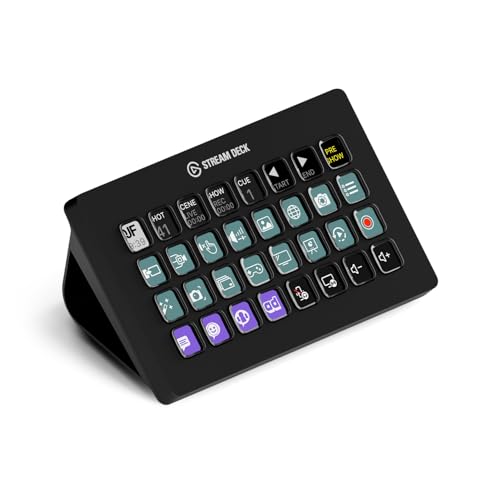
Elgato Stream Deck XL Advanced Studio Controller, 32 Keys | Instantly trigger unlimited actions, Powerful integrations, Visual feedback, Custom icon packs, Works with Mac and PC
Included for '7 Best Stream Decks (November 2026)' as a representative consumer electronics in this roundup; selection reflects the product set returned for this topic.
View on Amazon
Elgato Stream Deck +, Audio Mixer and Studio Controller | LCD keys, dials and touch strip, Multi actions and smart profiles, Unlocks Wave Link mixing, Works with Mac and PC
Included for '7 Best Stream Decks (November 2026)' as a representative consumer electronics in this roundup; selection reflects the product set returned for this topic.
View on Amazon
Elgato Stream Deck Mini, 6 Customizable LCD Macro Keys | Compatible with Zoom, Teams, Office, Adobe apps and more, Drag-and-drop setup, Multi-action sequencing, Works Mac and PC
Included for '7 Best Stream Decks (November 2026)' as a representative consumer electronics in this roundup; selection reflects the product set returned for this topic.
View on Amazon
VSD M18 Macro Pad Programmable Keypad, Stream Controller Streaming Deck, Customizable LCD keys, Gaming shortcut keyboard, USB sound board, Trigger actions in OBS, Twitch, YouTube, Works with PC Mac
Included for '7 Best Stream Decks (November 2026)' as a representative consumer electronics in this roundup; selection reflects the product set returned for this topic.
View on Amazon
Elgato Stream Deck + XL Control Platform, Dials, Touch Strip | 36 customizable macro keys, Six multifunction dials, Touch strip display, Hundreds of integrations, USB-C for PC and Mac
Included for '7 Best Stream Decks (November 2026)' as a representative consumer electronics in this roundup; selection reflects the product set returned for this topic.
View on Amazon
Elgato Stream Deck Neo, 8 Customizable Keys, 2 Touch Points | Automates repetitive tasks, Compatible with Zoom, Teams, Office apps, Smart home control
Included for '7 Best Stream Decks (November 2026)' as a representative consumer electronics in this roundup; selection reflects the product set returned for this topic.
View on Amazon| Product | Best for | Key spec from the title |
|---|---|---|
| Elgato Stream Deck MK.2 | The standard all-rounder | 15 macro keys, hundreds of plugins |
| Elgato Stream Deck XL | Big setups and many actions | 32 keys |
| Elgato Stream Deck + | Audio mixing and live control | LCD keys, dials, touch strip |
| Elgato Stream Deck Mini | Small desks and light use | 6 customizable LCD keys |
| VSD M18 Macro Pad | A lower-cost alternative | Customizable LCD keys, USB sound board |
| Elgato Stream Deck + XL | Maximum keys and dials | 36 macro keys, six dials, touch strip |
| Elgato Stream Deck Neo | Everyday productivity on a budget | 8 keys, 2 touch points |
How to Choose
Count the actions you repeat
List the tasks you perform several times a day, such as muting a mic, switching scenes, opening an app, or posting a canned reply. If the list has fewer than eight items, a small deck will do. Write the list down rather than guessing, because most people overestimate how many shortcuts they will really press. Between eight and fifteen items, a 15-key layout fits comfortably. More than that, or if you want folders and multi-actions, move to 32 keys or choose a model with dials so one control can handle volume or brightness without using a key.
Decide if you need dials
Dials and a touch strip suit audio mixing, lighting levels, and timeline scrubbing, where you want smooth adjustments rather than on-off presses. Titles that mention unlocking mixing software point to that use. Dials also keep your hands on one spot while you adjust, which helps in a live show. If you only trigger scenes and shortcuts, keys are enough, and dials add cost and desk space you may not use.
Check software and platform support
Most of the capability comes from the companion software and plugin library, not the plastic keys themselves. Confirm that your streaming tools, chat apps, and editing programs have plugins or can be triggered by hotkeys. Spend ten minutes browsing the plugin list for the exact apps you use every day, because that single check predicts how useful the deck will be. Check platform support on the listing. A device with great hardware is frustrating if your key apps cannot be controlled without manual setup.
Where cheaper alternatives cut corners
Lower-cost macro pads often have a smaller plugin library, less polished software, and fewer integrations with streaming services. They can still work well for hotkeys, but expect more manual setup. Ignore generic claims of compatibility with everything, and look for specific names such as OBS or Twitch in the title.
The 7 Best Options
Elgato Stream Deck MK.2
The MK.2 is the reference point for this category. The title lists 15 macro keys, triggers for OBS, Twitch, and YouTube, visual feedback, and hundreds of plugins.
- Strength: Fifteen keys cover scenes, audio toggles, and app shortcuts for most single-person setups.
- Strength: A large plugin library means many apps have ready-made actions, so setup is mostly dragging icons into place.
- Trade-off: No dials or touch strip, so smooth adjustments need workarounds.
Skip it if you want physical analog control of volume or lighting levels, which keys cannot imitate. Anyone who already knows they will build large multi-page layouts may outgrow fifteen keys within months. A white version also appears in the listings, with matching specs, so pick the color that suits your desk.
Elgato Stream Deck XL
The XL is built for people who outgrew fifteen keys. The title lists 32 keys, unlimited actions, powerful integrations, visual feedback, and custom icon support.
- Strength: Thirty-two keys let you spread scenes, sound effects, and shortcuts across one surface.
- Strength: Custom icons make large layouts easier to read at a glance, which matters when you press without looking.
- Trade-off: It takes up significant desk space, and the title is cut off, so confirm dimensions and cable length.
Skip it if your desk is cramped or your needs are modest. A smaller deck with folders can often cover the same list of actions. People who like a tidy, minimal desk should also weigh the cable routing and the space the wide body takes beside a keyboard.
Elgato Stream Deck +
The Stream Deck + adds analog controls. The title lists LCD keys, dials, a touch strip, multi-actions, smart profiles, and compatibility with Wave Link mixing.
- Strength: Dials make volume, brightness, and scrubbing smooth and intuitive.
- Strength: A touch strip adds quick swipes and context-sensitive feedback, so one control can change roles between apps.
- Trade-off: It has fewer keys than the XL, so large macro libraries need folders.
Skip it if you only trigger scenes and shortcuts. A white version with similar claims also appears in the listings. Buyers who do not mix audio will pay for features they leave unused. It also asks you to learn a more involved setup than a plain key grid, so expect some tinkering before it feels natural.
Elgato Stream Deck Mini
The Mini is the entry point. The title lists six customizable LCD macro keys, compatibility with Zoom, Teams, Office, and Adobe apps, drag-and-drop setup, and multi-action support.
- Strength: Six keys fit on a small desk and cover mute, camera, and a few app launchers.
- Strength: Drag-and-drop setup keeps the learning curve short for office workers who do not want to script anything.
- Trade-off: Six keys run out fast, so heavy users will need folders or a bigger deck.
Skip it if you stream with many scenes or sound effects. It suits workplace and light creator use better than a full production setup. Anyone planning to grow into complex scene switching should treat it as a stepping stone rather than a final purchase.
VSD M18 Macro Pad
The VSD M18 is the alternative to the brand leader. The title describes a programmable keypad and stream controller with customizable LCD keys, gaming shortcuts, and a USB sound board.
- Strength: LCD keys and programmable actions bring the basic deck experience to a different brand at the budget end of the range.
- Strength: A sound board function can trigger audio clips during streams and calls.
- Trade-off: The title is truncated, so confirm software support, supported platforms, and plugin availability.
Skip it if you depend on a deep plugin ecosystem or polished official software. Buyers who like predictable updates should favor the established option. Also remember that plugins written for the leading brand may not appear in a different brand’s software, so list the actions you need before buying.
Elgato Stream Deck + XL
This is the biggest control surface in the set. The title lists a control platform with dials, a touch strip, 36 customizable macro keys, six multifunction dials, and hundreds of integrations.
- Strength: Thirty-six keys plus six dials give a professional-style layout for mixing and scene control.
- Strength: A touch strip display adds quick adjustments without crowding the key grid, keeping the main keys free for scenes.
- Trade-off: It is a premium-tier device that needs a large desk footprint.
Skip it if you only need a handful of shortcuts. Casual users will not touch most of its controls. It also demands a wide, stable desk surface, and the visible title does not describe stand or mounting options, so confirm those on the listing.
Elgato Stream Deck Neo
The Neo is aimed at everyday productivity. The title lists eight customizable keys, two touch points, task automation, compatibility with Zoom, Teams, and Office apps, and smart home control.
- Strength: Eight keys plus touch points cover meetings, app launches, and home shortcuts.
- Strength: Smart home support helps with lights or scenes from the desk, a handy extra for a home office.
- Trade-off: Not enough keys for a busy streaming layout, and the title is cut off, so confirm streaming support.
Skip it if streaming is your main use, since eight keys vanish quickly once you add scenes and audio toggles. Streamers will likely prefer the 15-key MK.2. People who want dials for audio should look at the Stream Deck + rather than a bigger key count.
Which One Fits Your Situation
You are starting to stream
Choose the Elgato Stream Deck MK.2. It gives enough keys for scenes, mutes, and chat actions with room to grow, and the plugin library means you will rarely have to build an action from scratch. Add folders as your show gets more complicated.
You work in meetings all day
The Elgato Stream Deck Neo or the Mini handle mute, camera, and app shortcuts. Pick the Neo for the extra keys and touch points, or the Mini if desk space is the main limit. Both list compatibility with Zoom, Teams, and Office.
You mix audio live
The Elgato Stream Deck + brings dials and a touch strip, while the + XL adds more keys for bigger rigs. Podcasters who ride levels all session will use the dials constantly, so this is where the extra cost makes sense.
You want a lower-cost try
The VSD M18 is the cost-conscious alternative, and its sound board function is a bonus for clips and effects. Confirm software details first, and expect a bit more manual setup than with the leading brand.
Common Mistakes
- Buying the biggest model when a smaller one with folders would do.
- Skipping the plugin check for your key apps.
- Ignoring desk space and cable length before ordering.
- Paying for dials you will never use.
- Forgetting that the white and standard versions of the same model carry identical specs.
Related guides
- Popover Pan For Light And Airy Popovers
- Tennis Ball Machines For Home Practice
- Inverter Chargers For Off Grid Systems
Frequently Asked Questions
Do I need a stream deck to stream?
No. Hotkeys work, but a deck makes scene changes and audio toggles faster and reduces mistakes when you are live.
Can I use one for non-streaming work?
Yes. Many people use them for meeting controls, document shortcuts, and editing macros. Smaller models suit office use well, and a single key can open a set of apps, join a call, or paste a saved reply.
What are dials good for?
They suit continuous adjustments such as volume, brightness, or timeline scrubbing. Keys are better for one-press actions.
Which should I buy in 2026?
Match key count and dials to your list of repeated actions, and confirm software support for your apps on the listing. The older Classic model is listed as discontinued, so look at current units.
6 Best Awning Tents (November 2026)

6 Best Cedar Pergolas (November 2026)