Last Updated: November 11, 2026
Shopping for an engraving machine usually starts with one question that sounds simple and is not: what do you want to put your mark on? A hobbyist who wants to personalize wooden coasters, leather keychains, and felt ornaments has very different needs from a small seller who wants to mark metal tags in batches, or a crafter who wants to cut acrylic and print color on the same workpiece. The listings below span compact desktop diode lasers, enclosed machines with built-in cameras, a dual-laser model for metal marking, a large-bed cutter, and a handful of choices in between, so the first job is matching the machine class to your material list.
This guide is written for beginners and small-shop owners who want a machine for home DIY, gift making, or light production. It leans on the specs printed in each listing, such as wattage, working area, speed, and safety class, and it tells you plainly where a title is cut off so you can confirm the missing details on the product page before you buy. In 2026 the gap between a starter laser and a serious one is mostly about enclosure, camera alignment, and bed size, so those are the threads that matter throughout.

xTool M2 10W Laser Engraver, Built-in Dual Cameras, Class 1 Enclosed Safe Laser Engraving Machine for Home DIY Craft on Wood, Leather, Felt, Fabric, Paper
Included for '6 Best Engraving Machines (November 2026)' because the listing specifies Built-in Dual Cameras and Leather, details this guide uses to compare options.
View on Amazon
ACMER S1 Laser Engraver Machine, 2500mW Lazer Cutter for Wood and Acrylic | 130 x 130mm Working Area, Compact Desktop Design, Detailed Results for DIY Crafts and Small Projects
Included for '6 Best Engraving Machines (November 2026)' because the listing specifies 2500mW Lazer Cutter for Wood and Acrylic and 130 x 130mm Working Area, details this guide uses to compare options.
View on Amazon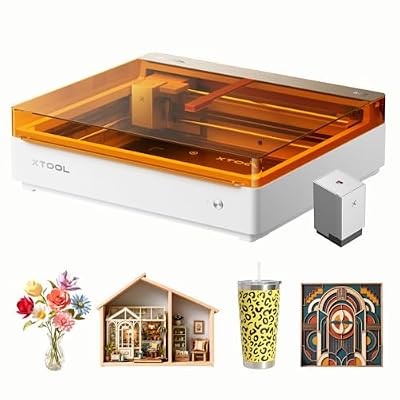
xTool M2 10W Color Craft Laser Engraver, with Full-Color CMYK Inkjet Printer, Built-in Dual Cameras, Class 1 Enclosed Safe Laser Engraving Machine for Wood, Leather, Felt, Fabric, Paper, DIY Crafts
Included for '6 Best Engraving Machines (November 2026)' because the listing specifies with Full-Color CMYK Inkjet Printer and Built-in Dual Cameras, details this guide uses to compare options.
View on Amazon
xTool F2 5W IR & 15W Diode Dual Laser Engraver, Built-in 50MP Camera, 6000mm/s Ultra Fast, 3D Embossing, Color Marking on Metal, On-Site & Small-Batch Ready, Portable Desktop Laser Engraving Machine
Included for '6 Best Engraving Machines (November 2026)' because the listing specifies Built-in 50MP Camera and 6000mm/s Ultra Fast, details this guide uses to compare options.
View on Amazon
xTool M2 20W Color Craft Laser Engraver, with Dual Cameras, CMYK Inkjet Printer, RA3 Lite Rotray, Class 1 Enclosed Safe Laser Engraving Machine for Wood, Leather, Felt, Fabric, Paper, DIY Crafts
Included for '6 Best Engraving Machines (November 2026)' because the listing specifies with Dual Cameras and CMYK Inkjet Printer, details this guide uses to compare options.
View on Amazon
xTool S1 40W Laser Cutter and Laser Engraver for Tumblers, 23.93" x 15.16" Bed Size, 600mm/s Speed, Laser Engraving Machine, Laser Engraver for Wood and Metal, Acrylic, Big Project - Rotary Bundle
Included for '6 Best Engraving Machines (November 2026)' because the listing specifies 23.93" x 15.16" Bed Size and 600mm/s Speed, details this guide uses to compare options.
View on AmazonQuick Picks
| Product | Best for | Key spec from the title |
|---|---|---|
| xTool M2 10W | Enclosed home crafting | 10W laser, dual cameras, Class 1 enclosed |
| ACMER S1 | Tight desks and first lasers | 2500mW, 130 x 130mm working area |
| xTool F2 | Marking metal in small batches | 5W IR plus 15W diode, 50MP camera, 6000mm/s |
| xTool M2 20W Color Craft | Cutting plus color printing | 20W, CMYK inkjet printer, rotary included |
| xTool S1 40W | Large projects and tumblers | 40W, 23.93 by 15.16 inch bed, 600mm/s |
| BlazeX M3 | Detail-focused beginners | 10W, 0.01mm precision claim |
How to Choose
Match the laser type to your materials
Diode lasers handle wood, leather, felt, fabric, paper, and dark acrylic well. Bare metal is a different story: a plain diode will typically darken or mark coated metal rather than etch raw steel, which is why the dual infrared plus diode design on the xTool F2 exists. If metal is on your list, look for an infrared source or a fiber design. If wood and leather are your focus, a single diode at 10W or above is enough and costs far less.
Read wattage and speed together
Wattage tells you how thick a material you can cut in a reasonable number of passes. A 2.5 watt machine is an engraver first and a cutter only for thin paper and veneer. Ten watts opens up thin plywood, while 20 and 40 watt units reduce the passes needed for thicker stock. Speed figures such as 600mm/s or 6000mm/s describe travel capability, so judge them alongside the power, not alone.
Check the work area and the enclosure
A 130 x 130mm area limits you to coasters and small tags. A bed near 24 by 15 inches handles cutting boards, signs, and drinkware jobs. An enclosed, Class 1 design keeps the beam contained, which matters if kids, pets, or a shared room are involved. Open-frame machines are cheaper and lighter but ask you to wear eyewear and manage smoke and fire risk on your own.
Value cameras, software, and accessories
Built-in cameras let you preview a design on the actual material, which cuts scrap waste. Rotary attachments are what allow cylinders like tumblers and mugs. Skip chasing the biggest wattage claim if you will never cut thick stock; spend on enclosure, alignment help, and ventilation instead. Budget machines tend to cut corners on motion rigidity, exhaust, and software polish.
The 6 Best Options
xTool M2 10W Laser Engraver
This is the most approachable pick for someone who wants an enclosed machine in the living space or garage. The listing highlights built-in dual cameras and a Class 1 enclosed safe design, aimed at home DIY work on wood, leather, felt, and fabric. That combination suggests easy positioning and a calmer safety profile than an open-frame diode.
- Strength: enclosed Class 1 design suits shared spaces.
- Strength: dual cameras help place artwork on irregular scraps.
- Trade-off: a 10W diode is not the tool for bare metal etching.
Skip it if your main goal is metal tags or if you need a large bed. The title is cut off, so confirm the exact material list and bed size on the listing. Buyers who plan to upgrade later should also look at what accessories this platform accepts, since that decides how far it can grow.
ACMER S1 Laser Engraver
The ACMER S1 is the small, simple entry point. The title lists a 2500mW laser, a 130 x 130mm working area, and a compact desktop design, framed for wood and acrylic projects and detailed results on DIY crafts. It fits on a crowded shelf and gives newcomers a way to learn power, speed, and focus settings without a big commitment.
- Strength: compact footprint for apartments and small desks.
- Strength: modest power makes it a gentle learning tool for engraving.
- Trade-off: the small area and low wattage limit cutting and larger pieces.
Skip it if you plan to cut plywood regularly or want to scale into small production. Treat it as a first machine for personalized gifts and light engraving, and plan to step up later if your orders grow beyond hobby volume or your pieces outgrow the small bed.
xTool F2 5W IR and 15W Diode Dual Laser
The F2 is the specialist here. The title pairs a 5W infrared source with a 15W diode, adds a 50MP camera and a 6000mm/s speed figure, and mentions 3D embossing and color marking on metal for on-site and small-batch work. That mix is aimed at people marking jewelry, tags, and branded items rather than cutting big sheets of wood.
- Strength: dual laser design targets metal marking that a lone diode struggles with.
- Strength: high-resolution camera and fast travel speed suit batch jobs.
- Trade-off: it is a niche, premium-leaning tool compared with general craft machines.
Skip it if you only work in wood and leather. The title is truncated, so check bed size and included accessories on the listing. Anyone weighing it should also decide whether the extra capability will actually get used, since a specialist tool earns its cost only with steady metal work.
xTool M2 20W Color Craft Laser Engraver
This version moves the M2 platform upward in two ways: a 20W laser and a CMYK inkjet printer, plus dual cameras and an RA3 Lite rotary attachment named in the title. It is built for crafters who want to cut a shape and print full-color artwork on it without moving to a second device.
- Strength: combined cutting and color printing covers a lot of craft ground.
- Strength: rotary support opens up cylindrical items.
- Trade-off: more hardware means more setup and ink or consumable upkeep.
Skip it if you want black-and-brown engraving only, since you would pay for features you never use. Confirm material compatibility on the full listing, because the title is cut off. It suits someone who sells personalized items and wants to avoid juggling a separate printer, but it asks for a bit more patience during the first setup.
xTool S1 40W Laser Cutter and Engraver
The S1 is the heavy-duty option on the list. The title names a 40W laser, a 23.93 by 15.16 inch bed, and a 600mm/s speed, and calls out tumblers specifically. That bed size allows signs, cutting boards, and multi-piece layouts, and the power should shorten the passes needed on thicker wood and acrylic.
- Strength: large bed handles full-size boards and multi-item batches.
- Strength: 40W power suits thicker cuts and faster production.
- Trade-off: it needs more bench space, ventilation, and a bigger budget than desktop minis.
Skip it if your projects are coaster-sized or your room is tight. Check enclosure details and included accessories on the listing, since the title does not finish. Because this class of machine is meant for longer jobs, buyers should also plan for proper exhaust and a stable workbench before the box even arrives.
BlazeX M3 10W Laser Engraver
The BlazeX M3 pitches itself at beginners who care about fine detail. The title lists a 10W laser, a 0.01mm ultra-precision figure, and use on wood, metal, glass, and leather, along with a beginner-friendly label. Those are marketing claims, so treat the precision number and the metal and glass claims as items to confirm on the listing, not as guarantees.
- Strength: 10W power is a solid middle ground for cutting thin stock.
- Strength: a broad material list suggests flexibility for varied gifts.
- Trade-off: the brand has a smaller footprint, so support and accessory depth are worth checking.
Skip it if you want a camera-guided enclosed system with a proven ecosystem. It makes more sense for a buyer who is comfortable reading the manual, adjusting focus by hand, and wearing proper eye protection during every job. Verify the safety features on the full listing before you commit.
Which One Fits Your Situation
You have one small desk and a gift-making habit
The ACMER S1 matches that scenario: small footprint, modest power, and a working area sized for tags and coasters. It lets you learn before spending more.
You share a room with kids or pets
Go with the xTool M2 10W. The Class 1 enclosed design is the clearest safety advantage among the listed products for a household setting.
You sell metal-marked items in small batches
The xTool F2 is built around that job, with its infrared plus diode pairing and camera. A wood-only machine will frustrate you here.
You want signs, boards, and drinkware
The xTool S1 40W offers the bed and power for that, while the M2 20W Color Craft fits people who want printed color and a rotary on a smaller frame.
Common Mistakes
- Buying on wattage alone and ignoring bed size, enclosure, and exhaust.
- Expecting a small diode to engrave raw metal cleanly.
- Skipping ventilation; smoke and fumes from wood, leather, and acrylic need a plan.
- Ignoring the engraving pen style tools in search results, which are handheld rotary devices and a different category from laser machines.
- Trusting truncated titles; always confirm the included accessories and material list on the product page.
Frequently Asked Questions
Can a beginner laser engraver cut wood?
Thin plywood and veneer are realistic at 10W and above, usually in several passes. Very low power units like a 2.5 watt model are better for engraving and thin materials.
Do I need an enclosed machine?
It is not required, but an enclosed Class 1 design contains the beam and some smoke, which helps in shared spaces. Open frames need eyewear and careful supervision.
What does a camera add?
A built-in camera lets you preview and align artwork on the real material, which reduces wasted blanks. It is especially useful on irregular scraps and leather.
Is a larger bed always better?
No. A big bed costs more and takes more room. If your pieces are smaller than a coaster-sized area, a compact machine is easier to live with. Consumables and add-ons such as air assist, honeycomb beds, and replacement lenses also add up, so budget a little beyond the machine itself.
6 Best Hot Air Brushes (November 2026)
Whataburger Menu Guide: Burgers, Breakfast Taquitos and Sauces