Last Updated: October 29, 2026
- Top 3 Picks
- Quick Comparison
- How We Chose
- 1. Aeotec Smart Home Hub – Best for Most Homes
- 2. Amazon Echo Show 21 – Best for a Wall-Sized Kitchen Command Centre
- 3. Amazon Echo Show 15 – Best for Smaller Kitchens and Hallways
- 4. Aeotec Smart Home Hub2 – V4 – Best for Tight Budgets
- 5. Homey Pro (2026) – Best for Multi-Protocol Households
- 6. Hubitat Elevation C-8 Pro – Best for Cloud-Free Automation
- 7. Aqara Smart Home Hub M3 – Best for Thread and Infrared Control
- 8. eufy Security Smart Display E10 – Best for eufy Camera Households
- 9. SONOFF Bridge Max (Bridge-M) – Best for Cheap Zigbee Expansion
For most households in 2026, the best smart home hub is the Aeotec Smart Home Hub. It runs the mature SmartThings platform, so it speaks Z-Wave and Zigbee as well as Matter, it works with Alexa and Google voice control out of the box, and it carries one of the longest device-compatibility lists of any hub in its price tier. It suits anyone who has accumulated a mix of older Z-Wave or Zigbee sensors alongside newer Matter gear and wants a single app, a single automation engine and a clear upgrade path. If you would rather have a screen on the wall than an invisible box, the Amazon Echo Show 21 is the strongest display-first choice. If maximum protocol coverage and local processing matter more than price, the Homey Pro (2026) is the enthusiast pick. If you are starting from nothing on a tight budget, the Aeotec Smart Home Hub2 – V4 gets you the same SmartThings software for less money. The rest of this guide compares protocol support, device compatibility, voice assistant integration, local control and setup complexity, so you can match a hub to the home you already live in rather than the home a marketing page imagines.
Top 3 Picks
Best overall: Aeotec Smart Home Hub. It combines Z-Wave, Zigbee and Matter support with the SmartThings ecosystem, wired Ethernet and working Alexa and Google integration. For a typical house with a mix of device generations and brands, it is the safest single purchase because almost nothing you already own becomes orphaned.
Best budget: Aeotec Smart Home Hub2 – V4. Same platform and app as the model above, at a lower price tier, with Zigbee and Matter gateway support rather than the full radio set. If you own no Z-Wave devices, this is the cheapest way into a serious automation platform rather than a single-brand accessory hub.
Best premium: Homey Pro (2026). It packs Z-Wave Plus, Zigbee, Wi-Fi, Bluetooth Low Energy, infrared and Matter into one box and runs automations locally, with an automation builder that handles logic that mainstream apps simply cannot express. It is the pick for the household that has six protocols and wants one brain for all of them.
Quick Comparison
The table below covers every hub in this roundup. Price tiers are general market ranges — budget, mid-range and premium — because listing prices move constantly and a tier is more useful for planning than a snapshot figure. Radios and protocols are listed as the manufacturer describes them, and “Matter controller” means the hub can add Matter devices to its own app rather than merely being a Matter device itself.
| Product | Best for | Radios & protocols | Notable specs | Price tier |
|---|---|---|---|---|
| Aeotec Smart Home Hub | Most mixed-brand homes | Z-Wave, Zigbee, Matter gateway; Ethernet + Wi-Fi | Runs SmartThings; Alexa and Google compatible | Mid-range |
| Amazon Echo Show 21 | Large kitchen command centre | Matter controller, Thread border router, Wi-Fi | 21-inch Full HD display, built-in Fire TV | Premium |
| Amazon Echo Show 15 | Smaller kitchens and hallways | Matter controller, Thread border router, Wi-Fi | 15.6-inch Full HD display, built-in Fire TV | Premium |
| Aeotec Smart Home Hub2 – V4 | Budget entry to a real platform | Zigbee, Matter gateway | Runs SmartThings; Alexa and Google compatible | Budget |
| Homey Pro (2026) | Multi-protocol power users | Z-Wave Plus, Zigbee, Wi-Fi, BLE, infrared, Matter | Local automation engine with visual Flow builder | Premium |
| Hubitat Elevation C-8 Pro | Cloud-free automation | Z-Wave, Zigbee, Matter | Local rules engine, no mandatory cloud account | Mid-range |
| Aqara Smart Home Hub M3 | Thread plus infrared control | Matter controller, Thread border router, Zigbee 3.0, IR | Ethernet and Wi-Fi, local automation, IR blaster | Mid-range |
| eufy Security Smart Display E10 | Households already on eufy cameras | eufy ecosystem hub, Wi-Fi | 8-inch touchscreen control panel | Premium |
| SONOFF Bridge Max (Bridge-M) | Cheap Zigbee expansion | Zigbee bridge with Matter bridging where supported | Compact bridge form factor, app-based setup | Budget |
| Like-New Echo Hub | Low-profile wall panel | Matter controller, Thread border router, Wi-Fi | 8-inch panel designed for Alexa+ | Mid-range |
| Tapo Smart IR & IoT Hub H110 | Infrared appliances on a budget | Matter-certified, infrared, low-power sensor radio | Universal remote control with built-in chime | Budget |
| Tapo Smart Hub H100 | First sensors and a doorbell chime | 2.4 GHz Wi-Fi required; Tapo sensor hub | Built-in chime, smallest possible entry cost | Budget |
How We Chose
Every hub here was assessed from manufacturer specifications, published platform documentation and the long-running community record of how each ecosystem behaves after the first week. Nothing was installed, benchmarked or handled — the goal is to tell you what each box will and will not do, not to rank the feel of its packaging.
Five criteria drove the selection. First, protocol coverage: which radios are physically inside the hub, and whether it acts as a Matter controller, a Thread border router, or both. Second, device compatibility: the size and quality of the integration library, and whether the hub depends on a cloud service to reach third-party devices. Third, voice assistant integration: whether Alexa or Google can control the devices the hub manages without an extra bridge. Fourth, local control: how much automation keeps running when the internet drops. Fifth, setup complexity and upgrade path: how much work is required before the first automation fires, and whether the platform grows with you or hits a ceiling.
We also weighed category fit. A wall panel solves a different problem from an invisible hub, and a single-brand bridge solves a different problem from a universal one. Each product below is judged against the job its listing actually claims, not against a generic hub ideal. Price is expressed only as a tier, because a hub that is a bargain this month may not be next month, and a tier tells you more about the long-term budget conversation anyway.
1. Aeotec Smart Home Hub – Best for Most Homes

Aeotec Smart Home Hub, Works as a SmartThings Hub, Z-Wave, Zigbee, Matter Gateway, Compatible with Alexa, Google Assistant, WiFi
Included for 'Best Smart Home Hubs for Your Connected Devices' because the listing specifies Works as a SmartThings Hub and Z-Wave, details this guide uses to compare options.
View on AmazonThe Aeotec Smart Home Hub is the hub to buy when your home is already a mix of things. It runs the SmartThings platform, which means the automation logic, the app and the device library come from one of the longest-running consumer smart home ecosystems rather than from a single hardware brand trying to keep you inside its own catalogue. If you have two Zigbee contact sensors from one brand, a Z-Wave plug from another and a Matter bulb from a third, this is the box that speaks to all of them without you running three apps.
Key specifications
- Platform: SmartThings, with the Aeotec hardware running the standard SmartThings hub software
- Radios: Z-Wave and Zigbee built in, plus Matter gateway support
- Thread: border router functionality arrives through the SmartThings platform where the model and region support it
- Networking: wired Ethernet and Wi-Fi, with Ethernet the more reliable option for a device that must never drop offline
- Voice: works with Alexa and Google Assistant, and the SmartThings app covers iOS and Android
- Power and placement: mains-powered via a USB supply, small enough to sit on a shelf or inside a media cabinet with a cable run
The strength of this hub is breadth. Z-Wave gives you access to a deep well of mature sensors, locks and thermostats that were designed for reliability rather than novelty. Zigbee gives you the cheaper, denser end of the market — bulbs, buttons, contact sensors, plugs. Matter gives you the newer gear that follows the cross-vendor standard. Because the SmartThings library has been built up over years, the practical compatibility list is longer than what you get from hubs that only speak Matter, and there is a real chance the obscure device you bought in 2019 still works.
Pros
- Two mesh radios plus Matter support in a single box covers most of what a mixed home owns
- Very large integration library, including devices that predate Matter
- Ethernet option removes the most common cause of hub instability
- Alexa and Google integration works without an additional bridge
- Clear upgrade path: add repeaters and devices without changing platforms
Cons
- Automation still leans on cloud services for a meaningful share of routines
- No infrared, no Bluetooth radio and no display
- The app interface has been reorganised more than once, which means muscle memory expires
- In a large house you will still need mains-powered repeaters to hold the mesh together
Against the Aeotec Smart Home Hub2 – V4, the difference is the radio set. The V4 covers Zigbee and Matter; this model adds Z-Wave, which matters if you own Z-Wave locks, thermostats or older sensors. Against the Hubitat Elevation C-8 Pro, the trade is opposite: Hubitat keeps automation on the device and asks more of you in setup, while this hub is friendlier but more cloud-reliant. If you want one box that handles the widest range of devices with the least friction, this is it.
2. Amazon Echo Show 21 – Best for a Wall-Sized Kitchen Command Centre

Amazon Echo Show 21 (newest model), Full HD 21" kitchen hub for home organization, with built-in Fire TV, Designed for Alexa+
Included for 'Best Smart Home Hubs for Your Connected Devices' because the listing specifies Full HD 21" kitchen hub for home organization and with built-in Fire TV, details this guide uses to compare options.
View on AmazonThe Echo Show 21 suits the household that wants the smart home to be visible and shared rather than hidden in an app. A 21-inch Full HD screen mounted in a kitchen or open-plan living space becomes the family dashboard: calendars, lists, timers, camera feeds and device tiles all in one place, with a built-in Fire TV for streaming. It also acts as a Matter controller and Thread border router, so it is a genuine hub rather than only a display.
Key specifications
- Display: 21-inch Full HD panel, designed for wall mounting or a counter stand
- Smart home role: Matter controller and Thread border router, so Matter and Thread devices join through it
- Voice: Alexa built in, which is the primary interface for both devices and entertainment
- Streaming: Fire TV built in, so it doubles as a television in a secondary room
- Networking: Wi-Fi, with the usual caveat that a large always-on panel benefits from a strong access point nearby
- Best placement: kitchen, hallway or utility area where several people pass it daily
The case for a display hub is behavioural, not technical. Automations that nobody can see get forgotten; a wall panel that shows the front door camera, the bin collection day and the thermostat makes the system part of daily life. The 21-inch size is the point — at this scale you can read it from across a room, run a shopping list during cooking, and use it as a second television without squinting. Because it is also a Matter controller and Thread border router, it earns its place in the hub category rather than being a tablet bolted to the wall.
Pros
- Large Full HD panel that stays legible from across a room
- Matter controller and Thread border router, so it genuinely manages devices
- Alexa voice control is native rather than bolted on
- Built-in Fire TV adds a second use that justifies the wall space
- Excellent for multi-person households and shared lists
Cons
- Premium tier pricing for what is partly an entertainment device
- No Z-Wave and no Zigbee, so older mesh gear still needs another hub
- Needs permanent wall space and a nearby power outlet
- An always-on panel draws noticeably more electricity than an invisible hub
The nearest alternative in this list is the Echo Show 15, which does the same job in a 15.6-inch footprint. Choose the 21 if the panel is the room’s main display and you want to read it from a distance; choose the 15 if wall space is tight or the screen sits in a hallway where you pass within arm’s reach. Both are Matter controllers with Thread border router support, so the decision is almost entirely about size, placement and budget rather than capability.
3. Amazon Echo Show 15 – Best for Smaller Kitchens and Hallways
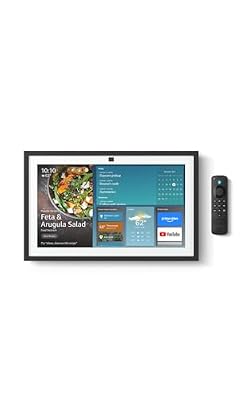
Amazon Echo Show 15 (newest model), Full HD 15.6" kitchen hub for home organization, with built-in Fire TV, Designed for Alexa+
Included for 'Best Smart Home Hubs for Your Connected Devices' because the listing specifies Full HD 15.6" kitchen hub for home organization and with built-in Fire TV, details this guide uses to compare options.
View on AmazonThe Echo Show 15 is the display hub for rooms that cannot spare a metre of wall. At 15.6 inches it is still large enough to function as a family dashboard, but it fits above a counter, beside a doorway or on a narrow strip of wall where a 21-inch panel would dominate. Like its larger sibling it is a Matter controller and Thread border router with a Full HD screen and built-in Fire TV, so it does the same smart home work in a smaller frame.
Key specifications
- Display: 15.6-inch Full HD panel, portrait or landscape orientation, wall-mountable
- Smart home role: Matter controller and Thread border router
- Voice: Alexa built in, with on-screen device tiles for touch control
- Streaming: Fire TV built in
- Networking: Wi-Fi
- Best placement: kitchens, hallways, utility rooms and anywhere with limited wall width
This is the model that converts sceptics. The screen size is small enough to be unobtrusive but large enough to be useful, and the landscape orientation works well for a calendar-and-camera layout while portrait suits lists and shopping. For renters, it is also the easier sell: a 15.6-inch panel on a removable mount leaves a smaller mark than a 21-inch one, and it can be moved between homes without dominating a new room. Because it is a Thread border router, it also quietly improves the Thread mesh in whatever part of the house it lives in.
Pros
- More placement options than the 21-inch model
- Matter controller and Thread border router built in
- Full HD resolution keeps text and camera feeds sharp
- Fire TV built in gives it a second job
- Portrait orientation is genuinely useful for lists and doorbell feeds
Cons
- Still premium tier, and not far below the 21-inch model in cost
- No Zigbee or Z-Wave radios
- Less legible than the 21-inch panel from across a large room
- Wall mounting needs a power cable routed sensibly, which is a real job in some rooms
Compared with the 21-inch Echo Show, the trade is legibility against placement. If your kitchen has a wall long enough for a big panel and you want to read it while cooking from two metres away, the 21 wins. If the screen goes in a hallway, a utility room or a compact kitchen where you approach within a metre, the 15.6-inch panel is the better fit and leaves more wall for cabinets, shelves or a clock. Compared with the Like-New Echo Hub, this model adds a much larger screen and Fire TV at the cost of size and money.
4. Aeotec Smart Home Hub2 – V4 – Best for Tight Budgets

Aeotec Smart Home Hub2 - V4, Works as a SmartThings Hub, Zigbee, Matter Gateway, Compatible with Alexa, Google Assistant, WiFi (No Z-Wave)
Included for 'Best Smart Home Hubs for Your Connected Devices' because the listing specifies Works as a SmartThings Hub and Zigbee, details this guide uses to compare options.
View on AmazonThe Aeotec Smart Home Hub2 – V4 is the budget route into a full automation platform rather than a single-brand accessory ecosystem. It runs the SmartThings software, supports Zigbee and Matter gateway functions, and works with Alexa and Google. For a first home, a rental flat, or a household that already owns Matter devices and wants a proper automation engine without paying mid-range money, it is the sensible entry point.
Key specifications
- Platform: SmartThings, the same software stack as the higher-tier Aeotec hub
- Radios: Zigbee and Matter gateway support
- Voice: works with Alexa and Google
- Networking: connects to your home network and stays online continuously
- Automation: full SmartThings routines, scenes and app-based control
- Best for: Matter-first homes and Zigbee sensor networks on a budget
The value argument here is software, not hardware. The SmartThings platform is the same whether you pay budget or mid-range money, so the difference between this hub and the more expensive Aeotec model is almost entirely the radio set. If every device in your home is Matter, Zigbee or Wi-Fi, this hub covers you. If you own Z-Wave locks or thermostats, it does not, and that is the one question worth answering before you buy. For everyone else, spending the difference on sensors rather than on a radio you will never use is the better allocation.
Pros
- Full SmartThings platform at a budget price tier
- Matter gateway support means newer cross-brand devices still join
- Zigbee covers the cheapest and densest end of the sensor market
- Alexa and Google integration without extra hardware
- Ideal second hub for a garage, annexe or outbuilding
Cons
- No Z-Wave radio, which rules out a large installed base of locks and thermostats
- Same cloud dependency as the rest of the SmartThings platform
- No display, no infrared and no Bluetooth
- Fewer radios means less flexibility if your device mix changes later
Against the higher-tier Aeotec Smart Home Hub, this is a straight radio trade: you give up Z-Wave and keep everything else, including the app, the automation engine and the voice integrations. Against the Tapo Smart Hub H100, the comparison favours Aeotec clearly — the Tapo entry hub is cheaper still but works within the Tapo ecosystem and requires 2.4 GHz Wi-Fi, whereas this one is a general-purpose automation platform. If your budget is the binding constraint and you own no Z-Wave gear, buy this and put the savings into sensors.
5. Homey Pro (2026) – Best for Multi-Protocol Households

Homey Pro (2026) | Smart Hub for Home Automation – Features Z-Wave Plus, Zigbee, Wi-Fi, BLE, Infrared, Matter & Thread. Compatible with Siri, Alexa & Google Home.
Included for 'Best Smart Home Hubs for Your Connected Devices' because the listing specifies Smart Hub for Home Automation and Features Z-Wave Plus, details this guide uses to compare options.
View on AmazonThe Homey Pro (2026) is the hub for the household that has stopped trying to standardise. It carries Z-Wave Plus, Zigbee, Wi-Fi, Bluetooth Low Energy, infrared and Matter in one box, and it runs automations on the device itself. That combination means it can talk to a Z-Wave radiator valve, a Zigbee sensor, an infrared air conditioner and a Matter light in a single routine, without you maintaining four apps and three bridges.
Key specifications
- Radios: Z-Wave Plus, Zigbee, Wi-Fi, Bluetooth Low Energy, infrared, and Matter support
- Thread: handled through the platform’s Matter and Thread capabilities
- Processing: automation logic runs locally on the hub rather than in a remote service
- Automation: a visual Flow builder that supports conditions, logic and multi-step sequences
- Networking: wired Ethernet and Wi-Fi
- Voice: integrates with the major voice assistants so devices remain controllable by voice
The infrared radio is the underrated feature. A large share of the appliances people actually want to automate — split-system air conditioners, older televisions, fans, some audio gear — accept only infrared commands. A hub with an IR blaster turns those into first-class citizens of your automation system, so a temperature sensor can trigger an air conditioner through a routine rather than a separate remote-control app. Combined with local processing, that makes this the most capable single box in this roundup.
Pros
- Six radio types in one device, which reduces bridge sprawl dramatically
- Local automation keeps working when the internet does not
- Automation builder handles logic that mainstream apps cannot express
- Infrared control covers air conditioners and older media gear
- Long useful life: it grows with a device collection instead of capping it
Cons
- Premium price tier, the highest investment in this roundup
- The automation builder has a learning curve; simple tasks take longer to set up than in mainstream apps
- Overkill for a home with fewer than roughly twenty connected devices
- Some integrations depend on community-maintained apps, which vary in polish
Against the Hubitat Elevation C-8 Pro, the closest philosophical rival, the difference is the audience. Both favour local control and both ask more of the owner than a mainstream app. Homey Pro adds infrared and Bluetooth and wraps its automation in a friendlier visual interface, which makes it easier to live with for a household where more than one person edits routines. Hubitat is the leaner, more technical option. If you want one premium box that handles everything and you are willing to learn it, Homey Pro is the pick.
6. Hubitat Elevation C-8 Pro – Best for Cloud-Free Automation

Hubitat Elevation C-8 Pro Smart Home Hub - Z-Wave Zigbee Matter
Included for 'Best Smart Home Hubs for Your Connected Devices' because the listing specifies Z-Wave Zigbee Matter, details this guide uses to compare options.
View on AmazonThe Hubitat Elevation C-8 Pro is aimed at the owner who does not want a cloud account in the critical path of their lighting. It supports Z-Wave, Zigbee and Matter, and it runs rules locally on the hub, so a motion-triggered light still works when the broadband drops or the vendor’s servers have a bad afternoon. It suits anyone who has been burned by an outage that turned their smart home dumb.
Key specifications
- Radios: Z-Wave and Zigbee, with Matter support
- Automation: a local rules engine that runs on the hub itself
- Cloud dependency: none required for day-to-day automation
- Networking: wired connection to your router
- Antennas: external, which helps in a house with thick walls or a hub tucked in a cupboard
- Voice: integrations exist for the major assistants, so voice control is possible without making it essential
The appeal is philosophical and practical at once. Local execution means latency measured in milliseconds rather than round trips to a data centre, and it means your automations survive both internet outages and the commercial decisions of a platform owner. The cost is setup: Hubitat assumes you will read documentation, choose your own dashboard layout and think about device pairing order. That is a feature for its audience and a barrier for everyone else.
Pros
- Automations run locally and keep running without internet
- No mandatory cloud account or subscription for core function
- Z-Wave, Zigbee and Matter in one hub
- External antennas improve range in awkward buildings
- Extremely flexible rule engine for unusual requirements
Cons
- Setup is more technical than mainstream hubs; expect an evening of configuration
- The interface prioritises capability over polish
- Some integrations rely on community-developed drivers
- No display and no infrared, so it is strictly an invisible hub
Against the Homey Pro (2026), Hubitat gives up infrared and Bluetooth and the friendlier visual builder, and gains a simpler, cheaper ownership model with an equally strong local-first philosophy. Against the Aeotec Smart Home Hub, the trade is control versus convenience: Aeotec has the larger ready-made integration library and a more familiar app, while Hubitat gives you privacy and offline reliability. If your priority is that the lights work during an outage, this is the one.
7. Aqara Smart Home Hub M3 – Best for Thread and Infrared Control

Aqara Smart Home Hub M3 for Advanced Automation, Matter Controller, IR
Included for 'Best Smart Home Hubs for Your Connected Devices' because the listing specifies Matter Controller, details this guide uses to compare options.
View on AmazonThe Aqara Smart Home Hub M3 sits in the sweet spot between a basic bridge and a full automation platform. It is a Matter controller and Thread border router, it manages Zigbee 3.0 devices, and it includes an infrared blaster for appliances that only understand remote-control signals. It suits households building around Thread and Matter who also want their air conditioner and television inside the same app.
Key specifications
- Smart home role: Matter controller and Thread border router
- Zigbee: Zigbee 3.0 hub for sensors, buttons and switches
- Infrared: built-in IR blaster for air conditioners, televisions and similar appliances
- Networking: Ethernet and Wi-Fi, so it can be wired in for stability
- Automation: local automation engine rather than cloud-only routines
- Best for: Thread-first builds and mixed Zigbee and IR setups
Thread is the reason to look here. As a border router, the M3 gives Thread devices a route onto your network, and a Thread mesh improves as you add more border routers — so a hub like this in a central location does quiet work for every Thread sensor and bulb in the house. The infrared blaster then covers the gap that Matter still has not closed: appliances with no smart radio at all. Together they make this a hub that handles both the newest and the oldest things in a room.
Pros
- Matter controller and Thread border router in one box
- Infrared control for air conditioners and media gear
- Zigbee 3.0 support for inexpensive sensors and buttons
- Ethernet option for a stable, always-on connection
- Local automation keeps core routines working offline
Cons
- No Z-Wave radio, so Z-Wave owners need a second hub
- Best value if you also use the brand’s own sensors, which narrows the ecosystem pull
- No display; it is an invisible hub
- Mid-range price for a hub that covers fewer legacy devices than the Aeotec option
Against the SONOFF Bridge Max, the M3 is the more complete device: it controls IR appliances, acts as a Thread border router and runs local automations, while the SONOFF bridge is a cheaper, narrower Zigbee-to-Matter bridge. Against the Aeotec Smart Home Hub, the difference is Z-Wave and ecosystem breadth versus Thread leadership and infrared. If your next purchases are all Matter and Thread, the M3 is the more forward-looking buy; if you have a drawer full of Z-Wave sensors, choose Aeotec.
8. eufy Security Smart Display E10 – Best for eufy Camera Households
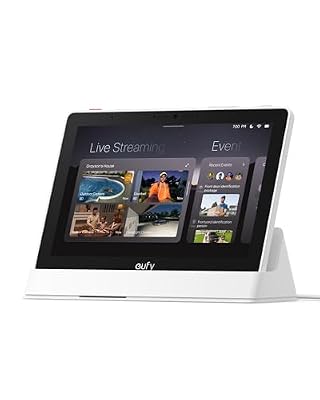
eufy Security eufy Smart Display E10, Smart Home Hub, 8" Control Panel
Included for 'Best Smart Home Hubs for Your Connected Devices' because the listing specifies Smart Home Hub and 8" Control Panel, details this guide uses to compare options.
View on AmazonThe eufy Security Smart Display E10 is a specialist rather than a generalist. It is an 8-inch touchscreen control panel and hub for the eufy ecosystem, which makes it the natural centrepiece for a home that already runs eufy cameras, doorbells and locks. Where a universal hub earns its place through protocol coverage, this one earns it by giving camera feeds and security controls a permanent, glanceable home on a wall.
Key specifications
- Display: 8-inch touchscreen control panel
- Role: hub and control surface for the eufy smart home and security ecosystem
- Networking: Wi-Fi
- Use case: live camera viewing, doorbell response, device control and security status at a glance
- Placement: hallway or kitchen wall, near the main entrance
- Price tier: premium, reflecting the screen and the security integration
The value of a dedicated security display is response time. When a doorbell rings, the difference between unlocking a phone, opening an app and waiting for a feed, and simply glancing at a wall panel, is several seconds and a lot of friction. For households with cameras at multiple entrances, that friction is the difference between the system being used and being ignored. The E10 is also a hub, so eufy devices can be managed from it rather than from a phone alone.
Pros
- Purpose-built for camera and doorbell workflows
- 8-inch touchscreen makes feeds and controls instantly visible
- Consolidates an existing eufy setup into one control surface
- Wall-friendly size for a hallway or kitchen
- Reduces reliance on phones for security tasks
Cons
- Narrow ecosystem: it is not a universal Matter, Zigbee or Z-Wave hub
- Premium tier pricing relative to the number of protocols supported
- Little benefit if you own no eufy devices
- Adds another always-on screen to your electricity bill
Against the Like-New Echo Hub, the comparison is scope against ecosystem. The Echo Hub is a general-purpose 8-inch panel that works across thousands of device types and Matter, while the E10 is deeper inside one brand’s security stack. If your home is built on eufy cameras, the E10 gives you a better security experience than a generic panel. If your devices come from six different brands, the Echo Hub is the more useful 8 inches of screen.
9. SONOFF Bridge Max (Bridge-M) – Best for Cheap Zigbee Expansion

SONOFF Bridge Max Smart Home Hub (Bridge-M)
Included for 'Best Smart Home Hubs for Your Connected Devices' as a relevant option in this category; details come from the product listing.
View on AmazonThe SONOFF Bridge Max is a budget bridge rather than a full automation platform. It exists to pair Zigbee devices and expose them to Matter-compatible platforms where supported, which makes it useful

Best Non Agitator Washing Machine for Gentle Cleaning

Best Sandals for Men: Comfort & Value