Last Updated: November 11, 2026
A small form factor PC is a trade. You give up the tower’s empty drive bays, the roomy airflow and the easy graphics card swap, and in return you get a computer that disappears behind a monitor, rides on a VESA bracket, or sits on a shelf next to the router. The real question behind this keyword is not “which one is fastest” but “how much computer can I fit into a footprint about the size of a hardcover book without paying for things I will never use.” That answer changes sharply depending on whether the machine will run a spreadsheet and a browser, drive three displays, or sit in a living room serving video.
This guide is for office managers outfitting a front desk, remote workers reclaiming desk space, home-lab tinkerers who want low idle power, and anyone building a media setup. It compares two very different families: refurbished business desktops, where a few generations of age buy a lot of RAM and storage for the money, and newer mini PCs with modern Ryzen and Intel chips, fast networking and multi-display output. Everything below is judged from the specs printed in each listing, so confirm the details on the product page before ordering in 2026.
Quick Picks

GMKtec G3S Mini PC Intel N95 Processor (Up to 3.4GHz) 8GB RAM 256GB M.2 SSD | Mini Desktop Computer with VESA Mount for Office Home Business HTPC Proxmox, Dual 4K Display, WiFi 5, Gigabit Ethernet
Included for '7 Best Small Form Factor Pcs (November 2026)' as a representative aquarium product in this roundup; selection reflects the product set returned for this topic.
View on Amazon
Dell Optiplex 3070 Micro PC | Windows 11 Pro | Intel i5-9500 | 16GB RAM + 500GB SSD | 5G WiFi + BT | Mini Desktop Computer (Renewed)
Included for '7 Best Small Form Factor Pcs (November 2026)' as a representative aquarium product in this roundup; selection reflects the product set returned for this topic.
View on Amazon
BOSGAME P3 Lite Mini PC AMD Ryzen 7 6800H, 32GB DDR5 RAM 1TB NVMe SSD | Dual 2.5GbE LAN, USB4, Triple 4K Display, Desktop Computer for Office, Home, Workstation
Included for '7 Best Small Form Factor Pcs (November 2026)' as a representative aquarium product in this roundup; selection reflects the product set returned for this topic.
View on Amazon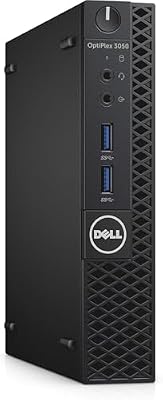
Dell OptiPlex 3050 Micro Form Factor Desktop Computer, Intel Core i5-7500T, 8GB DDR4, 256GB Solid State Drive, Windows 11 Pro (Renewed)
Included for '7 Best Small Form Factor Pcs (November 2026)' as a representative aquarium product in this roundup; selection reflects the product set returned for this topic.
View on Amazon
Dell Optiplex 7040 Micro Form Factor Desktop, Intel Quad Core i5 6500T 2.5Ghz, 16GB DDR4, 256GB NVMe SSD, Wi-Fi, HDMI, Windows 11 Pro (Renewed)
Included for '7 Best Small Form Factor Pcs (November 2026)' as a representative aquarium product in this roundup; selection reflects the product set returned for this topic.
View on Amazon
Dell OptiPlex 7040 Small Form Factor PC, Intel Quad Core i7-6700 up to 4.0GHz, 16G DDR4, 512G SSD, Windows 11 Pro (Renewed)
Included for '7 Best Small Form Factor Pcs (November 2026)' as a representative aquarium product in this roundup; selection reflects the product set returned for this topic.
View on Amazon
BOSGAME P4 Ultra Mini PC, Ryzen 7 7730U, 16GB DDR4, 1TB PCIe SSD | 8C/16T, up to 4.5GHz, Dual 2.5G LAN, Wi-Fi 6E & BT 5.2, Triple 4K Display Mini Desktop Computer, Home, Office & Business
Included for '7 Best Small Form Factor Pcs (November 2026)' as a representative aquarium product in this roundup; selection reflects the product set returned for this topic.
View on Amazon| Product | Best for | Key spec from the title |
|---|---|---|
| GMKtec G3S | Light office and HTPC use | Intel N95, 8GB RAM, 256GB M.2 SSD |
| Dell OptiPlex 3070 Micro | Everyday desk work on a tight budget | Core i5-9500, 16GB RAM, 500GB SSD |
| BOSGAME P3 Lite | Multi-monitor power users | Ryzen 7 6800H, 32GB DDR5, 1TB NVMe |
| Dell OptiPlex 3050 Micro | Basic tasks, point-of-sale stations | Core i5-7500T, 8GB DDR4, 256GB SSD |
| Dell OptiPlex 7040 SFF | Heavier office multitasking | Core i7-6700 up to 4.0GHz, 16GB, 512GB |
| BOSGAME P4 Ultra | Fast networking and Wi-Fi 6E | Ryzen 7 7730U, 8C/16T, dual 2.5G LAN |
| GMKtec M2 Pro S | Portable, USB4-ready workstation | Core i7-1185G7, Iris Xe, USB4 |
How to Choose
Match the processor generation to the job
Core i5 and i7 chips from the sixth through ninth generation still handle documents, video calls and dozens of browser tabs without complaint, which is why refurbished office machines remain popular. Where they fall short is video encoding, newer codecs and anything that leans on integrated graphics. Chips like the Ryzen 7 6800H and 7730U carry eight cores and noticeably stronger graphics, and the N95 sits at the efficient end for quiet, low-power duty. If the machine will live for five years, lean toward the newer silicon.
Set RAM and storage floors
Eight gigabytes is the practical minimum for Windows 11 plus a browser, but it leaves little headroom. Sixteen gigabytes is the comfortable target for office work, and 32GB makes sense only if you run virtual machines or heavy creative software. For storage, look for an NVMe or M.2 SSD of at least 256GB; 512GB or 1TB avoids the cleanup chore later. Check whether the RAM is DDR4 or DDR5, since that decides how upgrades will work.
Count ports and displays before you buy
Small chassis hide their port limits. If you plan to run two or three monitors, look for explicit mention of triple 4K output, USB4 or DisplayPort. Dual 2.5GbE helps with network-attached storage or routing projects, while a single gigabit port is fine for a desk. Wi-Fi generation matters too: Wi-Fi 6 or 6E is worth having in a house with a crowded network, and a VESA mount is useful if the PC will hang behind a display.
Understand what renewed really means
Renewed Dell units are reconditioned business machines, typically with a fresh Windows 11 Pro install and upgraded memory or storage. They are excellent value, but they use older power supplies and have no new-machine warranty cushion in the same way. Ignore the bare processor speed in the title when comparing generations, and focus on the model number, RAM and drive type. Budget models cut corners on drive size, wireless cards and cooling noise.
The 7 Best Options
GMKtec G3S Mini PC
The G3S is built around an Intel N95 processor listed at up to 3.4GHz, paired with 8GB of RAM and a 256GB M.2 SSD. The listing also highlights a VESA mount and positions it for office, home, business and HTPC duty. It is the kind of machine you tuck behind a television or a reception monitor and forget about. Pair it with a wireless keyboard and it becomes a tidy appliance for a break room, a classroom cart or a spare bedroom.
- Strength: A VESA mount makes it easy to hide behind a display.
- Strength: The efficient N95 suits always-on, low-power tasks.
- Trade-off: 8GB of RAM leaves little room for heavy multitasking.
Skip it if you plan to edit video or keep dozens of browser tabs open with a spreadsheet running alongside.
Dell OptiPlex 3070 Micro PC
This renewed micro desktop pairs an Intel Core i5-9500 with 16GB of RAM and a 500GB SSD, and the title lists Windows 11 Pro along with 5G Wi-Fi and Bluetooth. For a refurbished business machine that is a generous memory and storage allotment. Buyers building a home office on a budget will find the spec sheet hard to beat in this form factor. Since it is renewed, glance at the seller’s condition notes before you order.
- Strength: 16GB of RAM and a 500GB SSD cover most office workloads.
- Strength: Wi-Fi and Bluetooth are included, saving a separate adapter.
- Trade-off: Renewed hardware means an older platform and less warranty comfort.
Skip it if you need modern graphics output for several high-resolution displays or want brand-new components.
BOSGAME P3 Lite Mini PC
The P3 Lite is the muscle pick of the group, with a Ryzen 7 6800H, 32GB of DDR5 RAM and a 1TB NVMe SSD. The title also calls out dual 2.5GbE LAN, USB4 and triple 4K display support. That combination suits someone who wants a compact desk machine without compromising on memory or monitors. It also gives remote workers a path to keep the same box through a couple of software cycles.
- Strength: 32GB of DDR5 and 1TB of NVMe storage give real headroom.
- Strength: Triple 4K output and USB4 support serious multi-screen setups.
- Trade-off: It sits at a higher tier than the refurbished options.
Skip it if your work is limited to email and documents, since you would be paying for capability you will not use.
Dell OptiPlex 3050 Micro
The 3050 Micro is the entry point in this list: a Core i5-7500T, 8GB of DDR4 and a 256GB solid state drive, with Windows 11 Pro and a renewed label. It is a sensible choice for basic stations such as point of sale, digital signage or a family computer used for homework and streaming. Think of it as a dependable workhorse for jobs where a modern processor would simply be wasted.
- Strength: A solid state drive keeps boot times and app launches reasonable.
- Strength: The micro footprint fits on nearly any shelf or mount.
- Trade-off: The seventh-generation processor is the oldest in this guide.
Skip it if you want long-term longevity or plan to run more than a handful of applications at once.
Dell OptiPlex 7040 Small Form Factor
Moving up from the micro models, this renewed 7040 uses a Core i7-6700 with a boost of up to 4.0GHz, 16GB of DDR4 and a 512GB SSD. The small form factor chassis is larger than a micro, which generally leaves more room for expansion and cooling than the tiniest boxes. It is a reasonable pick for multitasking in an office setting. Accountants, schedulers and people who live in spreadsheets are the natural audience here.
- Strength: The i7 and 16GB of RAM handle heavier office multitasking.
- Strength: A 512GB SSD gives more breathing room than 256GB models.
- Trade-off: A sixth-generation platform will age faster than newer chips.
Skip it if you need to hide the PC behind a monitor, because this chassis is bulkier than the true micro units.
BOSGAME P4 Ultra Mini PC
The P4 Ultra uses a Ryzen 7 7730U, an 8-core, 16-thread chip listed at up to 4.5GHz, with 16GB of DDR4 and a 1TB PCIe SSD. Networking is a highlight: dual 2.5G LAN, Wi-Fi 6E and Bluetooth 5.2, plus triple 4K display support. That makes it a strong match for a home office that also acts as a small network hub. Confirm the exact port layout on the listing, since small chassis vary in what they expose.
- Strength: Dual 2.5G LAN and Wi-Fi 6E cover wired and wireless needs.
- Strength: Eight cores and 16 threads suit multitasking and light creative work.
- Trade-off: 16GB of DDR4 is less future-proof than the DDR5 in the P3 Lite.
Skip it if you only need a basic browsing machine; the networking and core count would go unused.
GMKtec M2 Pro S Mini PC
This one centers on an Intel Core i7-1185G7 with a turbo speed of 4.8GHz and Iris Xe graphics, along with 16GB of DDR4 and a 512GB SSD. The title adds Wi-Fi 6, USB4.0, Bluetooth 5.2 and DisplayPort. It is a good fit for someone who wants a fast, fairly capable machine they can carry between a home desk and an office. The USB4 connection means a single cable can potentially feed a dock, which keeps a desk uncluttered.
- Strength: Iris Xe graphics and USB4 add flexibility for displays and docks.
- Strength: The turbo speed gives quick single-thread responsiveness.
- Trade-off: The title is partly truncated, so confirm the port list on the listing.
Skip it if you want a Ryzen eight-core chip for sustained multi-threaded work.
Which One Fits Your Situation
You are furnishing a small front desk
Go with the Dell OptiPlex 3070 Micro. Its 16GB of RAM and 500GB SSD handle scheduling software, email and a browser easily, and the renewed price tier keeps a multi-seat purchase manageable.
You run three monitors for trading or editing
The BOSGAME P3 Lite is the match, thanks to its triple 4K output, USB4 and 32GB of DDR5 memory. It is the only one here that clearly pairs a high-end CPU with generous memory.
You want a quiet box behind the living room TV
The GMKtec G3S fits, with its VESA mount and efficient N95 chip aimed at HTPC use. Confirm the video output you need on the listing first.
You need fast networking in a home lab
Pick the BOSGAME P4 Ultra for dual 2.5G LAN and Wi-Fi 6E, along with eight cores for running a few containers.
Common Mistakes
- Buying on processor speed alone and ignoring the generation, which changes performance more than gigahertz.
- Settling for 8GB of RAM on a machine meant to last several years.
- Forgetting to check display outputs before planning a multi-monitor desk.
- Choosing a small form factor chassis when you actually need a true micro size to hide behind a monitor.
- Overlooking that a renewed unit has an older power brick and fewer modern ports.
Related guides
- Outdoor Dinnerware Set For Patio Entertaining
- Produce Storage Container For Refrigerator
- Patio Furniture Sets With Fire Pit Table
Frequently Asked Questions
Can a small form factor PC replace a full tower?
For office work, streaming and light creative tasks, yes. The main limits are upgrade room and graphics card support, so gamers and heavy 3D users should look elsewhere.
Is a renewed Dell worth it over a new mini PC?
If budget is the priority and your tasks are ordinary, a renewed OptiPlex gives plenty of RAM and storage for less. A new mini PC wins on modern ports, networking and newer processors.
How much RAM do I need?
Sixteen gigabytes is the comfortable target for most buyers. Eight is workable for basic use, and 32GB is only needed for virtual machines or demanding software.
Do these mini PCs support multiple monitors?
Several do. The BOSGAME models list triple 4K output, while others rely on HDMI and DisplayPort. Always confirm the exact ports on the listing.
Best Arcade Game Machines in 2026: Top Picks Compared

Best Long Term Refrigerators in 2026: Buying Guide