Last Updated: November 11, 2026
Putting two monitors on arms frees up the desk, lets you set each screen at the right height and distance, and ends the slow lean toward one side that comes from a laptop and a single stand. The catch is that “fits two monitors” covers a wide range of arms. Weight limits, screen size ranges, and clamp style decide whether a mount holds a pair of 24-inch office screens or sags under two heavy 32-inch panels.
This guide is for people who work, game, or edit on a two-screen desk and want to know what the titles actually promise. Most listings here support VESA 75×75 and 100×100 hole patterns, which covers the majority of modern monitors. Each title is read for screen range, weight per arm, and adjustment style, and anything vague is flagged as something to confirm on the listing. These are 2026 listings, and model versions change often, so check the details before you buy.

HUANUO FlowLift™ Dual Monitor Stand, Fully Adjustable Gaming Monitor Desk Mount for 13–32″ Computer Screens, Full Motion VESA 75x75/100x100 with C-Clamp & Grommet Base, Each Arm Holds 4.4 to 19.8 lbs
Included for '6 Best Dual Monitor Arms (November 2026)' because the listing specifies Fully Adjustable Gaming Monitor Desk Mount for 13 and 32″ Computer Screens, details this guide uses to compare options.
View on Amazon
ErGear Dual Monitor Arm, Full Adjustable Monitor Mount for 13–32″ Screens, Fast Install Computer Monitor Stand with Tool-Free VESA Mount, Load Range from 4.84 to 19.8 lbs, Max VESA 100x100mm
Included for '6 Best Dual Monitor Arms (November 2026)' because the listing specifies Full Adjustable Monitor Mount for 13 and 32″ Screens, details this guide uses to compare options.
View on Amazon
HUANUO Dual Monitor Stand - Full Adjustable Monitor Desk Mount Swivel Vesa Bracket with C Clamp, Grommet Mounting Base for 13 to 32 Inch Computer Screens - Each Arm Holds 4.4 to 19.8lbs - White
Included for '6 Best Dual Monitor Arms (November 2026)' because the listing specifies Grommet Mounting Base for 13 to 32 Inch Computer Screens and Each Arm Holds 4.4 to 19.8lbs, details this guide uses to compare options.
View on Amazon
ErGear Dual Monitor Stand up to 33 inches Screen, Load-Bearing Max 22 lbs Each Arm, Adjustable Dual Monitor Mount, Sturdy Steel vesa Monitor Mount with Stable VESA 75x75 100x100mm
Included for '6 Best Dual Monitor Arms (November 2026)' because the listing specifies Load-Bearing Max 22 lbs Each Arm and Adjustable Dual Monitor Mount, details this guide uses to compare options.
View on Amazon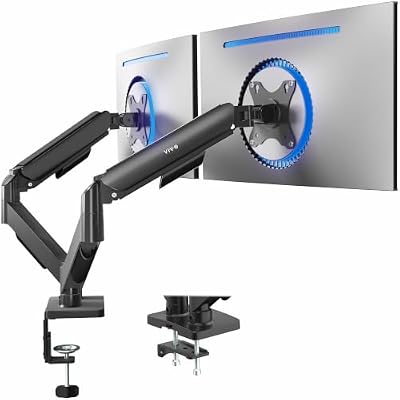
VIVO AeroPoise™ Dual Monitor Stand, for 17" to 32" Screens up to 19.8 lbs | Fully Adjustable Arms, Mechanical Articulating Desk Mount, VESA 75x75 and 100x100, Black, STAND-V002O
Included for '6 Best Dual Monitor Arms (November 2026)' because the listing specifies for 17" to 32" Screens up to 19.8 lbs and Fully Adjustable Arms, details this guide uses to compare options.
View on Amazon
WALI Adjustable Dual Monitor Arm for 13-32 inch Screens, 22 lbs per Arm | Dual Monitor Stand for Desk, Full Motion with Tilt, Swivel, Rotation, C-Clamp & Grommet Base, VESA 75/100mm (GSMP002N), Black
Included for '6 Best Dual Monitor Arms (November 2026)' because the listing specifies 22 lbs per Arm and Dual Monitor Stand for Desk, details this guide uses to compare options.
View on AmazonQuick Picks
| Product | Best for | Key spec from the title |
|---|---|---|
| HUANUO FlowLift | Gaming and full-motion setups | 13 to 32 inch screens, VESA 75×75 and 100×100 |
| ErGear Dual Arm | Fast, tool-free installs | 13 to 32 inch screens, tool-free VESA mount |
| VIVO AeroPoise | Lighter monitors, smooth movement | 17 to 32 inch, up to 19.8 lbs, mechanical articulating |
| WALI Adjustable Arm | Plain, dependable mounting | 13 to 32 inch, 22 lbs per arm |
| Acer Gas Spring Arm | Effortless height changes | Gas spring, 17 to 32 inch screens |
| Basics Gas Spring Arm | Smaller, lighter screens | 15 to 27 inch, 4.4 to 15.4 lbs each arm |
How to Choose
Check the weight window, both ends
Every arm has a weight limit per monitor, and gas spring models also have a minimum. The Basics arm lists 4.4 to 15.4 pounds per arm, which means a very light screen can float upward and a heavy one will not hold. Add up the weight of each monitor, without its stand, and compare it to the range. A listing that gives only a maximum may still need the minimum confirmed.
Screen size and VESA pattern
Look for your screen’s diagonal inside the stated range, and confirm the VESA pattern on the back of the monitor. A 75×75 or 100×100 pattern is the norm. Curved or ultrawide screens can be heavy and wide, so mounting a pair may exceed the arm’s reach. If a monitor has no VESA holes, you will need an adapter, which most of these listings do not include.
Gas spring or mechanical
Gas spring arms let you move the screen by hand with little effort and it stays where you leave it. Mechanical arms use a fixed tension that you set once. Gas spring arms tend to feel smoother, while mechanical ones can be simpler and are sometimes less sensitive to small weight changes. If you reposition screens often, favor gas spring designs. For a set-and-forget desk, mechanical is fine.
Clamp, grommet, and desk fit
Most listings mention both a C-clamp and a grommet mount. Check your desk thickness against the clamp range, and avoid glass tops or thin particle board without a reinforcement plate. Cable management clips on the arms keep wires tidy. Ignore marketing about “heavy-duty steel” unless it is paired with a listed per-arm weight. Budget models often cut corners with plastic caps and loose pivots that sag over time. Pay attention to how far the arms extend as well: a long reach lets you pull a screen close for detailed work, while a shorter reach suits a shallow desk that sits against a wall. Think about the eye-level goal too. The top edge of each screen should land near eye height, and an arm that cannot raise a monitor high enough defeats the purpose of buying one.
The 6 Best Options
HUANUO FlowLift Dual Monitor Stand
The FlowLift is a full-motion dual arm for 13 to 32 inch screens with VESA 75×75 and 100×100 support and a C-clamp. The title calls out gaming, which hints at a design meant for people who reposition screens for different games or tasks. It looks like a versatile all-rounder.
- Strength: the screen range covers small and large monitors.
- Strength: full-motion adjustment makes angling and rotating possible.
- Trade-off: the title does not state a per-arm weight limit, so confirm it on the listing.
Skip it if your monitors sit near the upper weight range and you need a clear limit before buying. Check whether the clamp fits your desk thickness, and look for cable clips if you want a tidy setup. For anyone who changes screen angles often, the full-motion design is the main selling point and worth the extra attention to the specs.
ErGear Dual Monitor Arm
The ErGear covers 13 to 32 inch screens and uses a tool-free VESA mount, which should save time when hanging a pair of monitors. The title mentions a load range, though it is cut off, so the exact weight window needs checking.
- Strength: tool-free VESA attachment speeds up assembly.
- Strength: the broad screen range suits many monitor sizes.
- Trade-off: the load range is truncated in the title, so confirm it before ordering.
Skip it if you want complete specs from the title alone. It suits people who want a quick setup and are comfortable verifying the weight range, especially anyone moving between desks or rearranging a home office. The brand sells several similar listings with different limits, so confirm which one you are viewing.
VIVO AeroPoise Dual Monitor Stand
This mechanical articulating arm fits 17 to 32 inch screens up to 19.8 pounds and supports VESA 75×75 plus another pattern the title cuts off. It describes fully adjustable arms and a desk mount, which suits a home office with mid-weight monitors.
- Strength: the 19.8 pound limit is clearly stated.
- Strength: fully adjustable articulating arms allow flexible positioning.
- Trade-off: the 17 inch minimum rules out smaller screens, and the VESA list is cut off.
Skip it if one monitor is heavier than the stated limit, or if you want a screen under 17 inches. Confirm the second VESA pattern and the clamp range. The weight limit is generous for typical office monitors but not for heavy gaming panels, so check each model’s weight before assuming it fits.
WALI Adjustable Dual Monitor Arm
The WALI lists 13 to 32 inch screens and 22 pounds per arm, with full motion, tilt, swivel, rotation, and a C-clamp. The title gives a per-arm limit and the range of motions, which makes it easy to judge against your own monitors.
- Strength: 22 pounds per arm covers most monitors in the stated range.
- Strength: tilt, swivel, and rotation give full positioning control.
- Trade-off: the title does not say whether the movement is gas spring or mechanical.
Skip it if you want effortless one-finger height changes, which usually need a gas spring design. This is a plain, dependable pick for people who value clear numbers, and the stated weight limit makes the buying decision refreshingly simple. Compare the clamp range with your desk, and check the full description for the VESA patterns it supports.
Acer Dual Monitor Arm
The Acer arm uses a gas spring for 17 to 32 inch screens and supports VESA 75×75 and 100×100, with both C-clamp and grommet mounting. Gas spring tension makes height adjustment easy, which helps if you share a desk or switch between sitting and standing at a height-adjustable desk.
- Strength: gas spring movement is smooth and light to adjust.
- Strength: two mounting choices suit different desk layouts.
- Trade-off: the title does not list a weight limit, so confirm it on the listing.
Skip it if your monitors are very light or very heavy, since gas spring arms work best inside a stated weight window. Read the tension adjustment notes in the full description before buying. Setting the tension is a one-time job with a small tool, and getting it right is what keeps the screen from creeping up or sinking. It is a good fit for shared desks where different people want different heights.
Basics Gas Spring Dual Monitor Arm
This arm lists adjustable tension, a 15 to 27 inch screen range, and 4.4 to 15.4 pounds per arm, plus VESA 75×75 and 100×100 support. It is aimed at typical office screens and has the clearest weight window in the group.
- Strength: both minimum and maximum weight are stated plainly.
- Strength: adjustable tension lets you balance different monitors.
- Trade-off: the 27 inch cap leaves out larger monitors.
Skip it if you own a 32 inch panel or a heavy gaming monitor. For two ordinary 24 inch office screens, it is a sensible match. Because the weight window starts above 4 pounds, an especially light travel display could float upward, so weigh your screens first. The title does not mention a clamp or grommet base, so confirm the mounting options on the listing, and check how the cable management looks if you hate visible wires on a clean desk.
Which One Fits Your Situation
You game on two large monitors
Start with the HUANUO FlowLift. Its 13 to 32 inch range and full-motion design are built for repositioning, though you should confirm the weight limit against your screens.
You have two standard office screens
The Basics gas spring arm is a clean fit, with clear numbers for screens up to 27 inches and easy tension adjustment.
You want the simplest install
The ErGear arm and its tool-free VESA mount make setup quicker, which helps in a rented space or a desk you rearrange often.
You adjust height all day
The Acer gas spring arm is the pick for frequent changes, since the movement is light and the 17 to 32 inch range is broad. It also suits a standing desk, where the screens travel up and down with the surface.
Common Mistakes
- Ignoring the minimum weight on gas spring arms, then watching a light monitor drift upward.
- Buying without checking the VESA pattern on the monitor, which leads to returns or adapters.
- Clamping to a thin or hollow desk edge without a reinforcement plate.
- Forgetting that two wide screens need enough desk width to sit side by side.
- Assuming every listing with a 32 inch range holds a heavy ultrawide, when the per-arm weight limit is the number that decides.
Frequently Asked Questions
Can a dual arm hold two ultrawide monitors?
Most listed arms are built for standard widescreen panels. Ultrawides are heavy and wide, so check the weight limit and the physical reach of each arm before trying to mount a pair.
Do I need to tighten the arm over time?
Mechanical arms can loosen with use, and a quick check of the pivots every few months helps. Gas spring arms sometimes need tension adjustments if you swap monitors.
Can I use a grommet mount on any desk?
Only if there is a hole or you can drill one, and the desk must be thick enough to support the load. Otherwise, the C-clamp is the easier choice, since it needs no drilling and can be moved if you rearrange the room. Whichever you pick, tighten the base fully and recheck it after the first week, because new mounts settle as the desk surface compresses slightly.
What if my monitor has no VESA holes?
You will need a VESA adapter plate, which is usually a separate purchase. Check that its weight limit covers your monitor before ordering, and look for a plate sized to match the screen’s hole spacing.
6 Best Headlamps (November 2026)

Sonic Drive-In Menu Guide: Burgers, Drinks, Shakes and Snacks